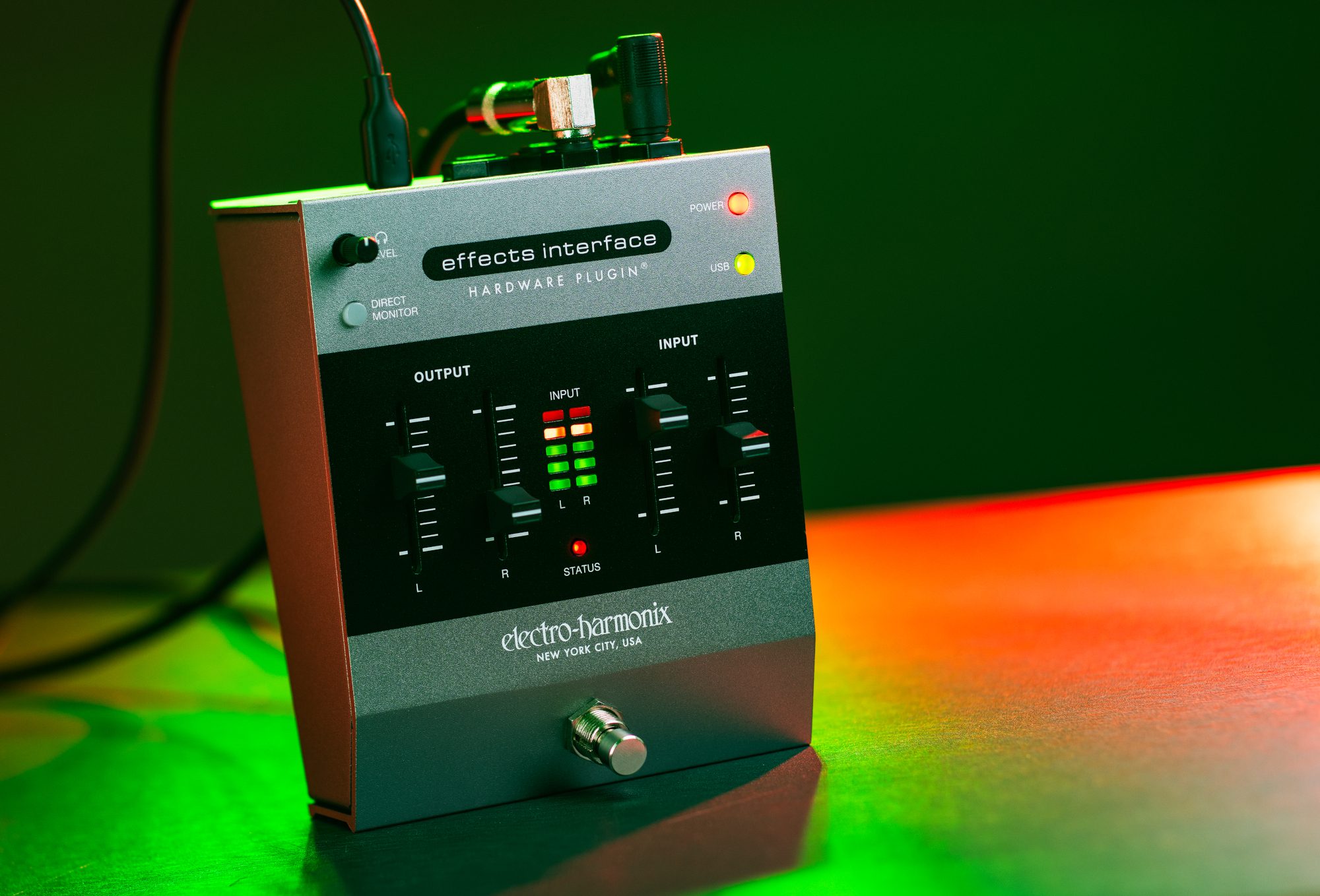
Effects Interface
[vc_row type=”full_width_content” full_screen_row_position=”middle” column_margin=”default” column_direction=”default” column_direction_tablet=”default” column_direction_phone=”default” bg_color=”#ffffff” scene_position=”center” text_color=”dark” text_align=”left” row_border_radius=”none” row_border_radius_applies=”bg” overflow=”visible” id=”features” row_name=”Features” overlay_strength=”0.3″ gradient_direction=”left_to_right” shape_divider_position=”bottom” bg_image_animation=”none” shape_type=””][vc_column column_padding=”padding-11-percent” column_padding_tablet=”inherit” column_padding_phone=”inherit” column_padding_position=”left-right” column_element_direction_desktop=”default” column_element_spacing=”default” desktop_text_alignment=”default” tablet_text_alignment=”default” phone_text_alignment=”default” background_color_opacity=”1″ background_hover_color_opacity=”1″ column_backdrop_filter=”none” column_shadow=”none” column_border_radius=”none” column_link_target=”_self” column_position=”default” gradient_direction=”left_to_right” overlay_strength=”0.3″ width=”1/1″ tablet_width_inherit=”default” animation_type=”default” bg_image_animation=”none” border_type=”simple” column_border_width=”none” column_border_style=”solid”][nectar_image_with_hotspots image=”213760″ preview=”https://www.ehx.com/wp-content/uploads/2025/11/EIHP_02.jpg” color_1=”Accent-Color” hotspot_icon=”plus_sign” tooltip=”hover” tooltip_shadow=”large_depth” animation=”true”][nectar_hotspot left=”36.07444077741108%” top=”18.20649048841403%” position=”left”] 9VDC 200mA Power Jack Plug the EHX 9VDC-200mA adapter, center negative, into this jack when using the Effects Interface as a standalone pedal.[/nectar_hotspot][nectar_hotspot left=”41.45122845617895%” top=”17.94881948708824%” position=”left”] USB-C Port Connect this to a USB port on your computer to use the Effects Interface with your DAW. The Effects Interface can be entirely powered by USB.[/nectar_hotspot][nectar_hotspot left=”48.473597359735976%” top=”17.955600302912604%” position=”left”] Headphone Jack Stereo headphone output of the Effects Interface. The headphones output the signal present at the L/R OUTPUT Jacks.[/nectar_hotspot][nectar_hotspot left=”55.693069306930695%” top=”18.430257410617997%” position=”left”] OUTPUT Jacks L/R Audio output from the Effects Interface. To use a physical guitar pedal as a plugin in your DAW, plug this into the external pedal’s input jack.[/nectar_hotspot][nectar_hotspot left=”62.86211954528787%” top=”18.932037781620846%” position=”left”] INPUT Jacks L/R Audio input for the Effects Interface. To use a physical guitar pedal as a plugin in your DAW, plug that pedal’s output into one of these jacks.[/nectar_hotspot][nectar_hotspot left=”34.548038137147046%” top=”25.146655484649315%” position=”left”] Headphone LEVEL Knob Sets the volume level of headphones inserted into the Headphone jack.[/nectar_hotspot][nectar_hotspot left=”34.5687%” top=”33.9922%” position=”left”] DIRECT MONITOR Button When using the Effects Interface as your audio interface, press this button to monitor (hear) the direct input from the Input jacks.[/nectar_hotspot][nectar_hotspot left=”71.53694536120278%” top=”26.607921294799496%” position=”right”] POWER LED Lights when the unit is powered up.[/nectar_hotspot][nectar_hotspot left=”71.57819948661532%” top=”34.4736676510603%” position=”right”] USB LED Lights red when USB is connected. Lights green when a successful connection has been made to the plugin in Audio mode.[/nectar_hotspot][nectar_hotspot left=”44.2955%” top=”52.0156%” position=”right”] OUTPUT Sliders L/R Sets the level of the signal sent by the Effects Interface on the OUTPUT L and R jacks.[/nectar_hotspot][nectar_hotspot left=”63.364%” top=”51.5037%” position=”left”] INPUT Sliders L/R Sets the level of the signal into the Effects Interface from the INPUT L and R jacks.[/nectar_hotspot][nectar_hotspot left=”57.05216354968831%” top=”84.54660210606716%” position=”right”] FOOTSWITCH and STATUS LED When using the Effects Interface on your pedalboard, either standalone or as a host for a digital plugin, press this footswitch to switch between bypass and effect modes.[/nectar_hotspot][/nectar_image_with_hotspots][/vc_column][/vc_row]
Specifications
- Circuit
- Digital
- Audio
- Stereo
- Power Type
- AC Power Adapter
AI Readiness
Good foundation, but some important product data is still missing.