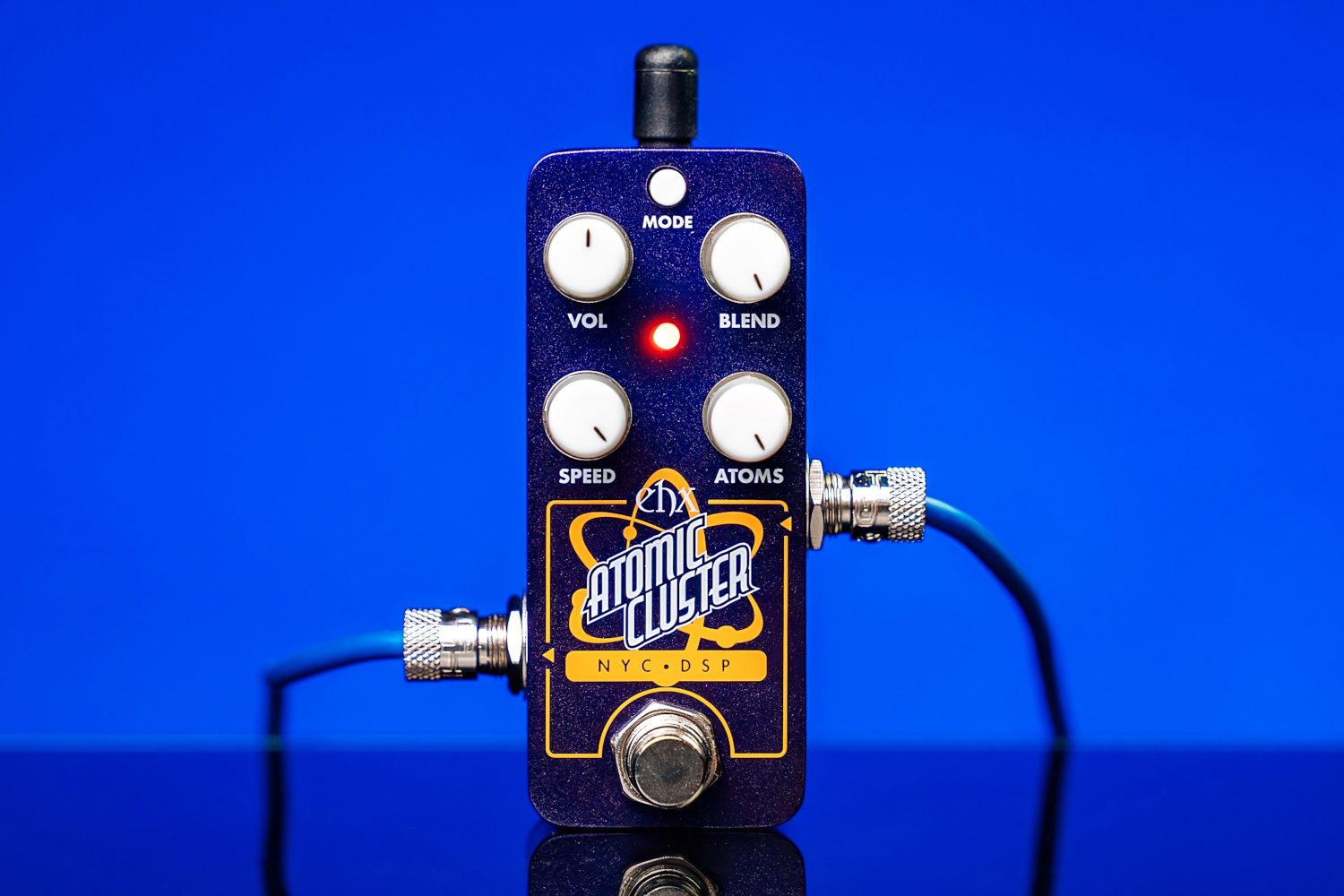
Pico Atomic Cluster
[vc_row type=”full_width_content” full_screen_row_position=”middle” column_margin=”default” column_direction=”default” column_direction_tablet=”default” column_direction_phone=”default” bg_color=”#ffffff” scene_position=”center” text_color=”dark” text_align=”left” row_border_radius=”none” row_border_radius_applies=”bg” overflow=”visible” id=”features” row_name=”Features” overlay_strength=”0.3″ gradient_direction=”left_to_right” shape_divider_position=”bottom” bg_image_animation=”none” shape_type=””][vc_column column_padding=”padding-11-percent” column_padding_tablet=”inherit” column_padding_phone=”inherit” column_padding_position=”left-right” column_element_direction_desktop=”default” column_element_spacing=”default” desktop_text_alignment=”default” tablet_text_alignment=”default” phone_text_alignment=”default” background_color_opacity=”1″ background_hover_color_opacity=”1″ column_backdrop_filter=”none” column_shadow=”none” column_border_radius=”none” column_link_target=”_self” column_position=”default” gradient_direction=”left_to_right” overlay_strength=”0.3″ width=”1/1″ tablet_width_inherit=”default” animation_type=”default” bg_image_animation=”none” border_type=”simple” column_border_width=”none” column_border_style=”solid”][nectar_image_with_hotspots image=”213667″ preview=”https://www.ehx.com/wp-content/uploads/2025/11/19.jpg” color_1=”Accent-Color” hotspot_icon=”plus_sign” tooltip=”hover” tooltip_shadow=”large_depth” animation=”true”][nectar_hotspot left=”48.10460212687936%” top=”17.801427178187357%” position=”left”] POWER JACK Current draw: 100mA at 9.0VDC.[/nectar_hotspot][nectar_hotspot left=”51.134488448844884%” top=”23.50163240187335%” position=”right”] MODE Button This button is used to control the transition style between the different oscillations: Red – Sharp Mode The transition between oscillations is instant, for a more rhythmic effect. Green – Smooth Mode The transition between oscillations is smoothly faded, for a more lush, ambient effect. NOTE: at very high SPEED settings, the difference between these two modes is subtle.[/nectar_hotspot][nectar_hotspot left=”47.155757242390905%” top=”28.87587878503406%” position=”left”] VOL Knob Adjusts the output volume.[/nectar_hotspot][nectar_hotspot left=”55.40199853318665%” top=”29.234433509611872%” position=”right”] BLEND Knob Adjusts the output mix from 100% dry to 100% wet.[/nectar_hotspot][nectar_hotspot left=”47.17180051338467%” top=”43.51957969563268%” position=”left”] SPEED Knob Sets how quickly the algorithm refreshes the oscillations it produces. This can also be controlled via tap-tempo.[/nectar_hotspot][nectar_hotspot left=”55.23010634396773%” top=”43.97999655787464%” position=”right”] ATOMS Knob Sets how many oscillations are produced at a given moment. TIP 1: Setting SPEED and ATOMS to maximum will give you a sound lose to your normal instrument sound. From there, play with lowering ATOMS and SPEED to get a feel for how these controls impact the effect. TIP 2: At lower numbers of ATOMS, you will likely get a more interesting and varied effect with a brighter input signal (a signal with more high frequency content). If using a guitar, consider the bridge pickup and/or using distortion before the Atomic Cluster.[/nectar_hotspot][nectar_hotspot left=”59.6558%” top=”57.5399%” position=”right”] INPUT JACK Audio input to the Pico Atomic Cluster.[/nectar_hotspot][nectar_hotspot left=”42.7942794279428%” top=”59.841968634936535%” position=”left”] OUTPUT JACK Audio output from the Pico Atomic Cluster.[/nectar_hotspot][nectar_hotspot left=”51.33846718005134%” top=”75.28834319032867%” position=”right”] FOOTSWITCH & STATUS LED Footswitch engages or bypasses the effect. The LED color indicates the selected mode. In bypass, the LED is off.[/nectar_hotspot][/nectar_image_with_hotspots][/vc_column][/vc_row]
Specifications
- Circuit
- Digital
- Bypass
- Buffered Bypass
- Current Draw
- 100mA
AI Readiness
Good foundation, but some important product data is still missing.